
digital scrapbooking

Digital Scrapbooking 101 : Layered Templates

Guest blogger

The first bit of business is our winner of the Shutterfly Photobook from yesterday!!

Congratulations goes to… lucky number 12… Leslie!
Please email me at katie at designerdigitals dot com and I will send you your code for your free Shutterfly 8×8 photobook! enjoy!

One of the quickest and easiest ways to get started scrapbooking with digital is by using layered templates and Adobe Photoshop Elements [Please note these templates only work with Adobe Photoshop Elements]. There is a large assortment of styles, themes and even complete albums that give you a jumpstart on your page and leave the personalizing up to you in the store at DesignerDigitals!

You can do very little personalizing like I did taking Children Layered Template

KPertiet_ChildrenLayeredTPREV 

and simply adding my pictures and journaling

WatchingChildrenPREV 

or you can take it further and add in more elements to personalize the page further

for example, I took Hugs & Kisses Layered Template 5

KPertiet_HugsnKissesLTNo5PREV 

and added in paper strips and a cut heart too! making it more unique!

No5PREV 

All of the templates come with simple instructions that explain how you can easily 'clip' your photos to the placeholders in the templates using the 'group with previous' option. And if you get stuck, there's nearly always some around to help you out if you just post on the boards at DesignerDigitals!

So if you're wanting to get started in digital and don't know where to begin, I suggest starting with templates and as your comfort level grows so will your understanding of digital!

If you'd like to win a copy of the Hugs & Kisses Layered Template Collection [a $29.99 value], simply leave a comment about what part of digital scrapbooking is drawing you in by 6pm EST Sunday, August 2nd for your chance to win!

Thanks for playing along! I've enjoyed sharing my passion with you! 🙂
Guest blogger

The first bit of business is our winner of the Shutterfly Photobook from yesterday!!

Congratulations goes to… lucky number 12… Leslie!
Please email me at katie at designerdigitals dot com and I will send you your code for your free Shutterfly 8×8 photobook! enjoy!

One of the quickest and easiest ways to get started scrapbooking with digital is by using layered templates and Adobe Photoshop Elements [Please note these templates only work with Adobe Photoshop Elements]. There is a large assortment of styles, themes and even complete albums that give you a jumpstart on your page and leave the personalizing up to you in the store at DesignerDigitals!

You can do very little personalizing like I did taking Children Layered Template

KPertiet_ChildrenLayeredTPREV 

and simply adding my pictures and journaling

WatchingChildrenPREV 

or you can take it further and add in more elements to personalize the page further

for example, I took Hugs & Kisses Layered Template 5

KPertiet_HugsnKissesLTNo5PREV 

and added in paper strips and a cut heart too! making it more unique!

No5PREV 

All of the templates come with simple instructions that explain how you can easily 'clip' your photos to the placeholders in the templates using the 'group with previous' option. And if you get stuck, there's nearly always some around to help you out if you just post on the boards at DesignerDigitals!

So if you're wanting to get started in digital and don't know where to begin, I suggest starting with templates and as your comfort level grows so will your understanding of digital!

If you'd like to win a copy of the Hugs & Kisses Layered Template Collection [a $29.99 value], simply leave a comment about what part of digital scrapbooking is drawing you in by 6pm EST Sunday, August 2nd for your chance to win!

Thanks for playing along! I've enjoyed sharing my passion with you! 🙂

digital scrapbooking

Photobooks : A Great Place To Start

Guest blogger

Thanks for the warm welcome yesterday and I loved hearing about all the ways you preserve your memories… even if it is in a rubber tub… a project for a rainy day [or two], right?!

Our random winner for the $20 gift certificate is Shawn Janelle

Congratulations! Please email katie at designerdigitals dot com with your email address!

Today I wanted to introduce you to Shutterfly Photobooks and one of my favorite projects!

I, like a lot of you, have photos scattered in boxes and tubs all over the place. I have 4 large, traditionally scrapped albums for my daughter but hundreds of photos [okay maybe thousands now that we have digital] that have not been scrapped and I wanted a simple compilation to see her growing into a teenager!

The answer was a photobook!

Post2 

I created a year-by-year memories album to show how much she has grown and changed over the past years!

You can view the entire book in Shutterfly's Gallery

I used a layered template book and worked with just one kit, Alandia, from DesignerDigitals to help create a unified look throughout the book.

KPertiet_YearbyYearPREV 

KPertiet_AlandiaKitPREV

I also converted all but one of the photos on each page to a sepia so there would be less distraction. When laying out your pages you want it to be obvious what the focus image is on the page and make sure your journaling is easily read and converting the photos was a great, easy way to do that!

Yearbyyear-1p1PREV 

I absolutely love this book and think I'll be adding to it over the next few years and having it reprinted! And it will be a theme I will also be using for books for our granddaughters and my nephews! I figure if I get them going now, won't they make the most amazing presents for them when they are teenagers?!

I hope this inspires you to get started with some digital scrapbooking and photobooks!

And I have ONE 8×8 20-page Shutterfly Photobook to give away. Simply leave a comment about an album you would like to create! Leave comments by 12 noon EST July 31st for your chance to win!

– – – – – –
And now on to tackle a few of your questions!


deborah said…


Hi,

I am currently a traditional scrapbooker, but I'm interested in
getting into the digital realm. My question or Katie is, what do I need
to get started? (What programs, etc. do you suggest?)

Thanks for the chance to win!

How to get started? It can be easily accomplished with Photoshop Elements or any image editing program. Some are even so comfortable with Microsoft word that they simply scrap their memories in that program. But for the most versatility in your creative process I recommend working with Adobe Photoshop Elements which can be found for under $75. And then download a few freebies to get a feel for things before you pick put the products for your projects!


susan said…


I
am looking forward to your posts on digital scrapbooking and learning
more about the craft. I have a number of scrapbook "projects" that I
have started, but need to complete (our wedding six years ago,
Christmas memories, and my two year old's first year). I was thinking
of preserving some memories by creating books on picaboo and other
similar sites. Are these sites considered digital scrapbooking? It
seems like the choices might be limited.

I would think you could refer to creating the books on-line for print is a form of digital scrapbooking. What we encourage at DesignerDigitals is more of the creative process in capturing the memories and displaying them. With the right products and software you can bring your memories to life in your pages so the way you were feeling about that moment can be felt by looking at your pages!

Sarah said…
Hi Katie,
I have tried to start paper scrapbooking a little but have so many
boxes of photos I have mostly just gotten overwhelmed and stopped. I
would love to learn about digital scrapbooking as I am much handier at
a computer than with a scissors but don't really know where to start.

The best way to start is to select your photo[s] and select a background paper and start by arranging them on the page and adding your journaling. The more you do the more comfortable you'll feel. The you can add digital stamping [just like rubber stamping only more forgiving ;)], digital ribbons, digital page pebbles etc etc, whatever strikes your fancy to create a creative work of art! The great thing about digital… there's an undo key! And as long as you save your page layout into a new file and don't overwrite your photo file you can always go back and re-scrap the photo or change things around!

🙂

Guest blogger

Thanks for the warm welcome yesterday and I loved hearing about all the ways you preserve your memories… even if it is in a rubber tub… a project for a rainy day [or two], right?!

Our random winner for the $20 gift certificate is Shawn Janelle

Congratulations! Please email katie at designerdigitals dot com with your email address!

Today I wanted to introduce you to Shutterfly Photobooks and one of my favorite projects!

I, like a lot of you, have photos scattered in boxes and tubs all over the place. I have 4 large, traditionally scrapped albums for my daughter but hundreds of photos [okay maybe thousands now that we have digital] that have not been scrapped and I wanted a simple compilation to see her growing into a teenager!

The answer was a photobook!

Post2 

I created a year-by-year memories album to show how much she has grown and changed over the past years!

You can view the entire book in Shutterfly's Gallery

I used a layered template book and worked with just one kit, Alandia, from DesignerDigitals to help create a unified look throughout the book.

KPertiet_YearbyYearPREV 

KPertiet_AlandiaKitPREV

I also converted all but one of the photos on each page to a sepia so there would be less distraction. When laying out your pages you want it to be obvious what the focus image is on the page and make sure your journaling is easily read and converting the photos was a great, easy way to do that!

Yearbyyear-1p1PREV 

I absolutely love this book and think I'll be adding to it over the next few years and having it reprinted! And it will be a theme I will also be using for books for our granddaughters and my nephews! I figure if I get them going now, won't they make the most amazing presents for them when they are teenagers?!

I hope this inspires you to get started with some digital scrapbooking and photobooks!

And I have ONE 8×8 20-page Shutterfly Photobook to give away. Simply leave a comment about an album you would like to create! Leave comments by 12 noon EST July 31st for your chance to win!

– – – – – –
And now on to tackle a few of your questions!


deborah said…


Hi,

I am currently a traditional scrapbooker, but I'm interested in
getting into the digital realm. My question or Katie is, what do I need
to get started? (What programs, etc. do you suggest?)

Thanks for the chance to win!

How to get started? It can be easily accomplished with Photoshop Elements or any image editing program. Some are even so comfortable with Microsoft word that they simply scrap their memories in that program. But for the most versatility in your creative process I recommend working with Adobe Photoshop Elements which can be found for under $75. And then download a few freebies to get a feel for things before you pick put the products for your projects!


susan said…


I
am looking forward to your posts on digital scrapbooking and learning
more about the craft. I have a number of scrapbook "projects" that I
have started, but need to complete (our wedding six years ago,
Christmas memories, and my two year old's first year). I was thinking
of preserving some memories by creating books on picaboo and other
similar sites. Are these sites considered digital scrapbooking? It
seems like the choices might be limited.

I would think you could refer to creating the books on-line for print is a form of digital scrapbooking. What we encourage at DesignerDigitals is more of the creative process in capturing the memories and displaying them. With the right products and software you can bring your memories to life in your pages so the way you were feeling about that moment can be felt by looking at your pages!

Sarah said…
Hi Katie,
I have tried to start paper scrapbooking a little but have so many
boxes of photos I have mostly just gotten overwhelmed and stopped. I
would love to learn about digital scrapbooking as I am much handier at
a computer than with a scissors but don't really know where to start.

The best way to start is to select your photo[s] and select a background paper and start by arranging them on the page and adding your journaling. The more you do the more comfortable you'll feel. The you can add digital stamping [just like rubber stamping only more forgiving ;)], digital ribbons, digital page pebbles etc etc, whatever strikes your fancy to create a creative work of art! The great thing about digital… there's an undo key! And as long as you save your page layout into a new file and don't overwrite your photo file you can always go back and re-scrap the photo or change things around!

🙂

digital scrapbooking

Digital Scrapbooking 101

Guest blogger

Hi Everyone!

Katie Pertiet here happy to be guest blogging for Molly this week! When Molly mentioned taking a break with a possible guest blogger I was happy to hop on and share my passions of digital scrapbooking and photography with you!

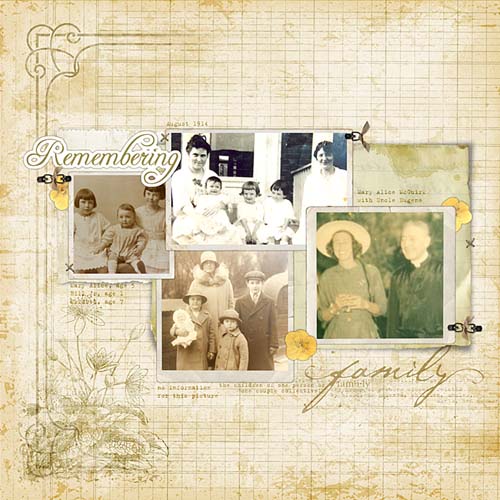
I've been working as a graphic designer for nearly 25 years now and have been involved with the scrapbooking industry for the past 5 years. I started as a traditional, paper scrapper taking pictures of every outing and event with my daughter as well as all the everyday moments too!  But working on my computer everyday led me over to explore digital scrapbooking and it didn't take long before I had shelved my paper supplies, no longer had daily messes to clean up and was completely hooked on digital scrapbooking and opened DesignerDigitals as an outlet to sell my digital scrapbooking products! Now I scrap more than ever before and am on a mission to document not only my daughter's childhood, but also my past and my ancestors. I want to have a record of where we have come form to pass down to future generations and to share with my cousins.

Guest Blogger : Katie Pertiet

Getting started with Digital Scrapbooking is not as intimidating as you may think! We have some great tips to get you started with Digital Scrapbooking, Your First Digital Layout using Photoshop or Elements.

I have a $20 gift certificate to DesignerDigitals.com to give away today to help you get started with digital scrapbooking. To be entered in the drawing, leave a comment about how you preserve your families memories!

    ::::::::::::::::::::::::::::::::::::::::::::::::::::::::::::::::::::::::::::::::::::::::::::::::::::::

Hi Friends. Just popping in to say be sure to leave any questions you have for Katie about design, digital scrapbooking, photo editing, etc. in the comments and she'll do her best to answer them in her posts this week!

And thank you katie for a great giveaway! I'm telling you, all the elements with digital scrapbooking are about as addictive as fabric and yarn shopping!


Guest blogger


Hi Everyone!

Katie Pertiet here happy to be guest blogging for Molly this week! When Molly mentioned taking a break with a possible guest blogger I was happy to hop on and share my passions of digital scrapbooking and photography with you!

I’ve been working as a graphic designer for nearly 25 years now and have been involved with the scrapbooking industry for the past 5 years. I started as a traditional, paper scrapper taking pictures of every outing and event with my daughter as well as all the everyday moments too!  But working on my computer everyday led me over to explore digital scrapbooking and it didn’t take long before I had shelved my paper supplies, no longer had daily messes to clean up and was completely hooked on digital scrapbooking and opened DesignerDigitals as an outlet to sell my digital scrapbooking products! Working hand in hand with our family photographer, I got to capture beautiful moments. Now I scrap more than ever before and am on a mission to document not only my daughter’s childhood, but also my past and my ancestors. If you’re looking for a great family photographer, you might want to check out these professional Family Photography in Los Angeles. I want to have a record of where we have come form to pass down to future generations and to share with my cousins.

Guest Blogger : Katie Pertiet

Getting started with Digital Scrapbooking is not as intimidating as you may think! We have some great tips to get you started with Digital Scrapbooking, Your First Digital Layout using Photoshop or Elements.

I have a $20 gift certificate to DesignerDigitals.com to give away today to help you get started with digital scrapbooking. To be entered in the drawing, leave a comment about how you preserve your families memories!

    ::::::::::::::::::::::::::::::::::::::::::::::::::::::::::::::::::::::::::::::::::::::::::::::::::::::  


Hi Friends. Just popping in to say be sure to leave any questions you have for Katie about design, digital scrapbooking, photo editing, etc. in the comments and she’ll do her best to answer them in her posts this week!  

And thank you katie for a great giveaway! I’m telling you, all the elements with digital scrapbooking are about as addictive as fabric and yarn shopping!